

Files & photos
Organize what matters—from family records and photos to business documents and project files.
Your life. Your work. Thoughtfully organized.
Bring your files, photos, email, calendars, contacts, notes, tasks, and reading library together in one LightDrive account. Whether you’re organizing your household or managing a small business, keep what matters organized and within reach.
Start with a free 30-day Ray trial. Paid subscription billing is not currently enabled.
Start your 30-day Ray trial with 150 GB of file storage. No payment method is required. How the trial works
We do not sell your personal information or use your private content for advertising. Our business model is simple: membership fees—not advertising revenue. We earn your business by providing useful tools and caring for what you entrust to us.
Read our Privacy PolicyA place for the everyday
Your LightDrive workspace is called the Vault—a place for what you keep, what you plan, and what you want to return to.
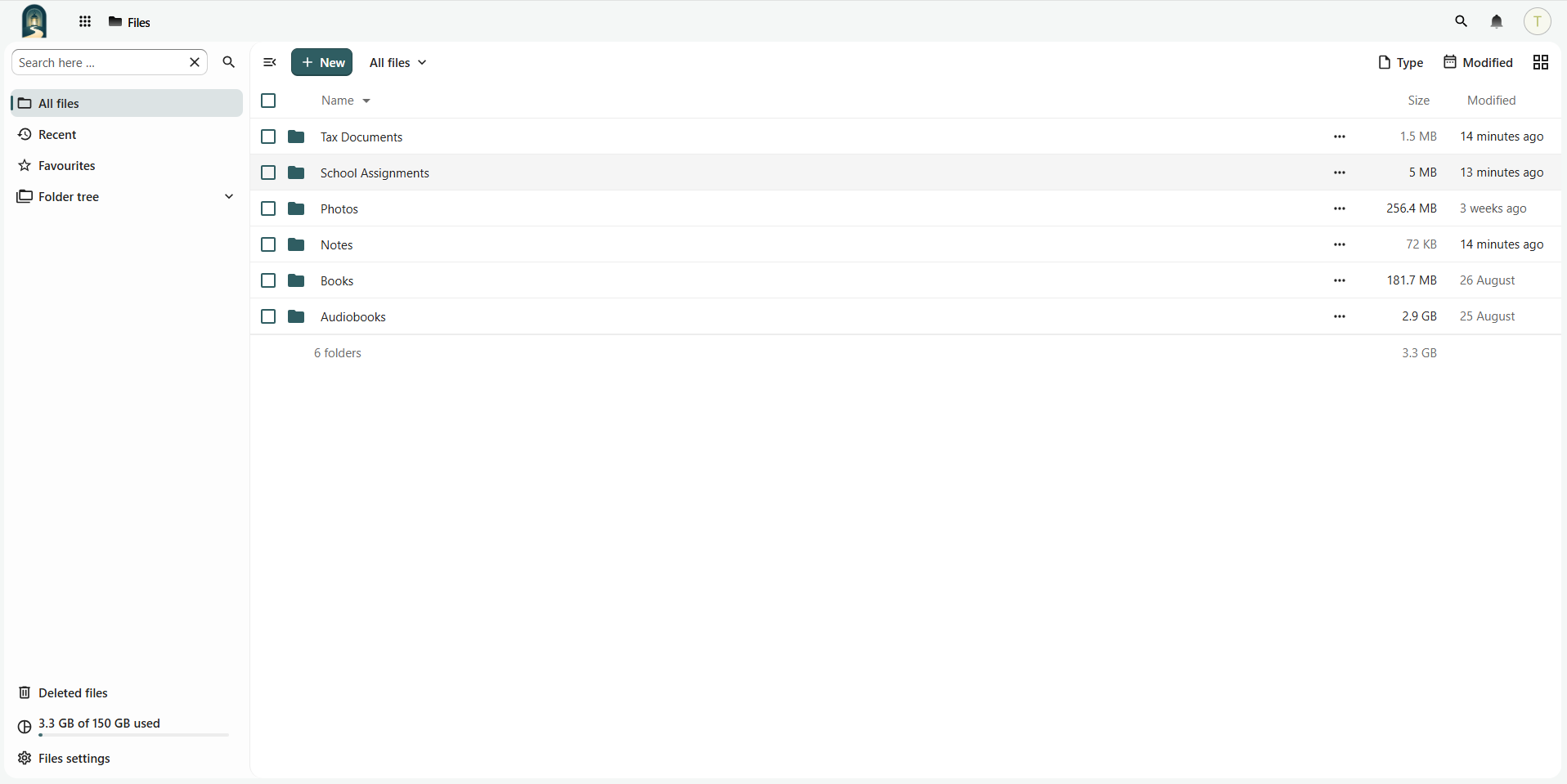
Organize what matters—from family records and photos to business documents and project files.
Stay on top of correspondence, appointments, and contacts for everyday life and business.
Capture ideas and meeting notes, organize project to-dos, and keep track of your next steps.
Keep your own ebooks and audiobooks together for enjoyment, learning, and professional development.
Your digital life deserves more than storage. It deserves responsible stewardship. LightDrive is built to care for your files, communications, memories, and personal information with a philosophy that puts your interests first—not advertising, profiling, or data exploitation.
Choosing LightDrive means being more intentional about who you trust with your data.
Simple monthly plans
Compare monthly prices and file-storage allowances. Paid subscription billing is not currently enabled.
More than file storage: email, calendars, contacts, notes, tasks, photos, and your personal reading library in one LightDrive account.
Your 30-day trial includes Ray with 150 GB of file storage. Beam and Glow prices are shown for comparison; paid subscriptions and upgrades are currently unavailable.
For everyday essentials
$9 USD / month
150 GB file storage
More room to grow
$15 USD / month
750 GB file storage
For larger collections
$39 USD / month
2 TB file storage
Begin with a 30-day Ray trial and 150 GB of file storage. No payment details are required to get started.
Plan allowances refer to file storage in the Vault. Mailbox storage is separate and is not deducted from your file-storage allowance. Service limits apply. View plan details
Paid subscription billing is not currently enabled. You will not be charged automatically at trial end while billing remains disabled.
Every new trial starts on Ray with 150 GB of file storage for 30 days after recovery-email verification. No payment method is required to get started. Paid subscription billing is not currently enabled, so you will not be charged automatically at trial end while billing remains disabled.
When paid billing is enabled, adding a payment method preserves the time remaining in your trial. You can then choose Beam or Glow and receive the increased storage immediately. Your original trial-end date stays the same: changing plans does not start a new 30-day trial or trigger an immediate subscription charge. The first subscription charge occurs at your original trial end unless you cancel beforehand; your membership then renews monthly unless canceled.
Without a payment method, the subscription pauses and access becomes limited when the trial ends. Check your trial-end date and access in Settings → Plan & Billing.
Prices are in USD per month. Paid subscription billing is not currently enabled; paid plans cannot currently be purchased. Plan and billing details · Terms of Service
Getting started
Choose your username and password, and provide an outside recovery email address.
Follow the link in your verification message. Your 30-day Ray trial begins after verification.
Make yourself at home. Start bringing copies of your files, photos, and other information from Microsoft, Google, Apple, or Dropbox into LightDrive—one collection at a time. Our Help Center can guide your first steps.
Your 30-day Ray trial starts with 150 GB of file storage after recovery-email verification. No payment method is required. Beam and Glow prices are shown for comparison; paid subscription billing is not currently enabled.
No payment method is required to start your trial. Paid subscription billing is not currently enabled, so you will not be charged automatically at trial end while billing remains disabled. Without a payment method, the subscription pauses and access becomes limited at the end of the 30-day trial. Check your trial-end date and access in Settings → Plan & Billing.
Paid subscriptions and upgrades are currently unavailable because paid billing is not enabled. Beam and Glow prices are shown for comparison. When paid billing is enabled, you can add a payment method and choose Beam or Glow to receive the increased storage immediately. You keep your original trial-end date, with no new 30-day trial and no immediate subscription charge. The first subscription charge occurs at the original trial end unless you cancel beforehand.
There is no paid renewal to cancel while paid billing remains disabled. Review your trial-end date and access in Settings → Plan & Billing. When paid billing is enabled, cancellation stops renewal and preserves service through the displayed service-end date. Immediate account deletion is a separate action. Export the information you need before service ends.
Use your LightDrive workspace in a browser, or sync files with a compatible Nextcloud desktop or mobile client. Compatible email, calendar, and contacts apps use the documented settings and service-specific credentials. Compatible ebook readers can connect to your Books catalog using OPDS, a standard for browsing and downloading ebooks. Check the device setup guide for your app and connection steps.
You can upload files and use the import options documented for each app. Supported formats and steps vary by service. Check the Help Center before moving a collection, and keep your original copy until you have checked the result.
No. Mailbox storage is tracked separately and is not deducted from your file-storage allowance. Deleting a file does not free mailbox space, and deleting an email does not free file space. A mailbox at its limit can stop accepting new messages.
Browse the public Help Center for setup and everyday use. Signed-in customers can use Settings → Support in the Vault. Before joining, or if you cannot sign in, use the public support email in the footer.
LightDrive’s approach to privacy, ownership, and care for customer data is shaped in part by our Christian understanding of stewardship: what is entrusted to us should be handled faithfully and responsibly. We build LightDrive to serve people of every background, and we believe those principles should be reflected in how we treat every customer and their data.
Explore the stewardship philosophy behind LightDrive—and discover practical ways to organize and care for your digital life, at home and at work.

April 28, 2026
Data has value as property and carries obligations to other people. Faithful stewardship means caring for all information we create, control, or can access, while respecting the people represented in…

July 7, 2026
Data stewardship extends beyond saved files to behavioral traces, inferences, metadata, inherited collections and household recordings. What is collected and retained varies by service and settings, and individuals cannot control…

October 9, 2026
Choosing a home camera does not amount to consent to every use of its recordings. Other people filmed may have had no choice. Recent Flock disputes and historical privacy cases…
Make room for what matters
Start your 30-day Ray trial with 150 GB of file storage. No payment method is required. How the trial works